What is in it: the ask box, the drawings behind it, and the three things the office gets asked about every week.
No scheduling, no RFI workflow, no daily logs. ProSearchAI does one job deeply: it reads what you already have and answers from it, with the page.
From upload to a cited answer
The pipeline is the product. Everything else on this page is a way of looking at what it produced.
- 1UploadPDF, DOCX, images or a ZIP of a whole submittal folder. Presigned upload straight to storage.
- 2Read every pageText layer first. Pages with no text are OCR'd. Pages that look like drawings go to vision.
- 3Vision on drawingsSheet number, title, discipline, callouts, equipment and schedules come back as structured data.
- 4Chunk and embedPage-aware chunks, each prefixed with the file and sheet, embedded and indexed for text and vector search.
- 5AskHybrid retrieval, an answer written only from the excerpts, and a numbered citation on every claim.
Ask the documents. Every claim carries a citation, and every citation opens the page.
Type or speak a question in a project. The answer streams in with numbered citations after each claim; the sources line lists the file and sheet or page behind each number. Click one and the page viewer opens on the right at that page, with the quote highlighted. Threads keep the conversation so a follow-up (“and LP-2?”) knows what you meant.
- Answers come only from the excerpts, and say so when the documents do not have it
- Page viewer: PDF rendering, or the rendered image for large drawing sets; copy the quote, open or download the file
- Thumbs up and down on every answer; admins see the feedback
- Deep-answer mode on Team and above reads more excerpts on the larger model
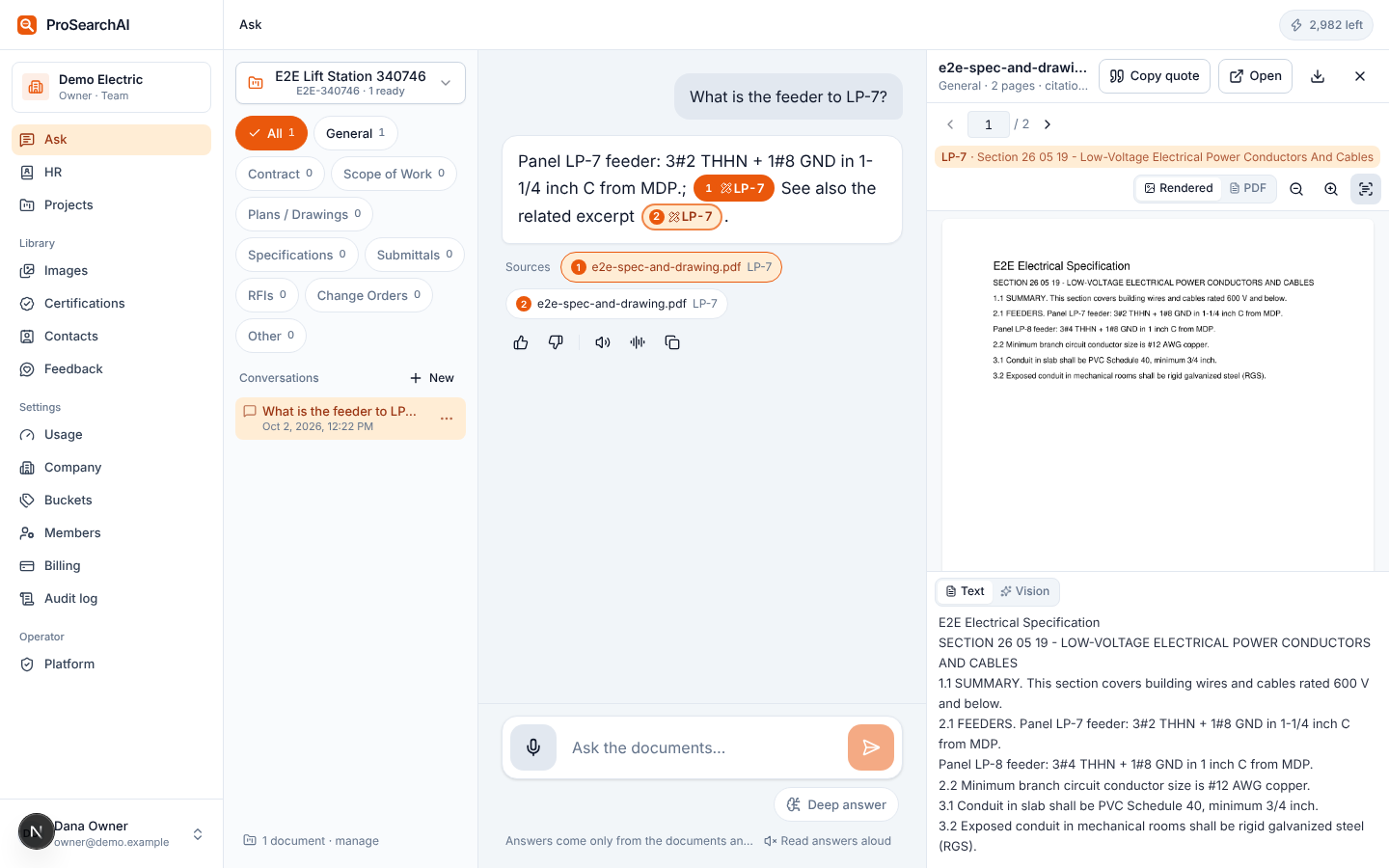
Drawing search: sheets read by vision, not just the eleven words on the text layer.
Pages that look like drawings are rendered and read by a vision model that returns the sheet number, title, discipline, callouts, equipment and schedules as data. That gets indexed alongside the text, and sheet and panel names get a fuzzy index so “E401” finds E-401. Ask for a panel, a detail or a keyed note by name and the answer cites the sheet.
- Vision on pages classified as drawings (default), on every PDF page, or off, per company
- Scanned pages with no text layer are OCR'd first
- Each page is rendered once; the viewer shows the image when the PDF is too big to load on a tablet
An HR knowledge base everyone can ask and only admins can change
A separate space for the handbook, safety manual, benefits summaries, per-diem policy and whatever else the office answers the same question about every week. Members ask in the same box they use for projects. Admins decide what goes in and whether the base is visible to everyone or only to admins.
- Its own buckets (Policies, Safety, Benefits, Forms)
- Same citations and page viewer
- Disclaimer text and version you control, accepted once per user
Ask with the mic, listen with gloves on
On a phone in the trailer the keyboard is the slow part. Hold the mic button, ask, and the transcript goes in as the question. Every answer has two speaker buttons: the instant browser voice, which is free, and a higher-quality voice that is generated once and cached.
- Up to two minutes of audio per question
- Transcription and read-back do not count as questions
- Works on the mobile layout at 390 px with big tap targets
Projects, buckets and who sees what
Each project holds its documents in buckets: Plans / Drawings, Specifications, Submittals, RFIs, Change orders, Contract, Scope of work, and any local buckets you add. Company defaults are copied into each new project so every job looks the same. Upload by drag and drop, multiple files or a ZIP of a whole folder; each file shows its status while it indexes, and a failed file can be retried.
- Projects visible to the whole company or to members only
- Members can upload if the project allows it; managers always can
- Duplicate detection by file hash, with a replace-as-new-version option
- Archived projects stay searchable and stop counting toward the limit
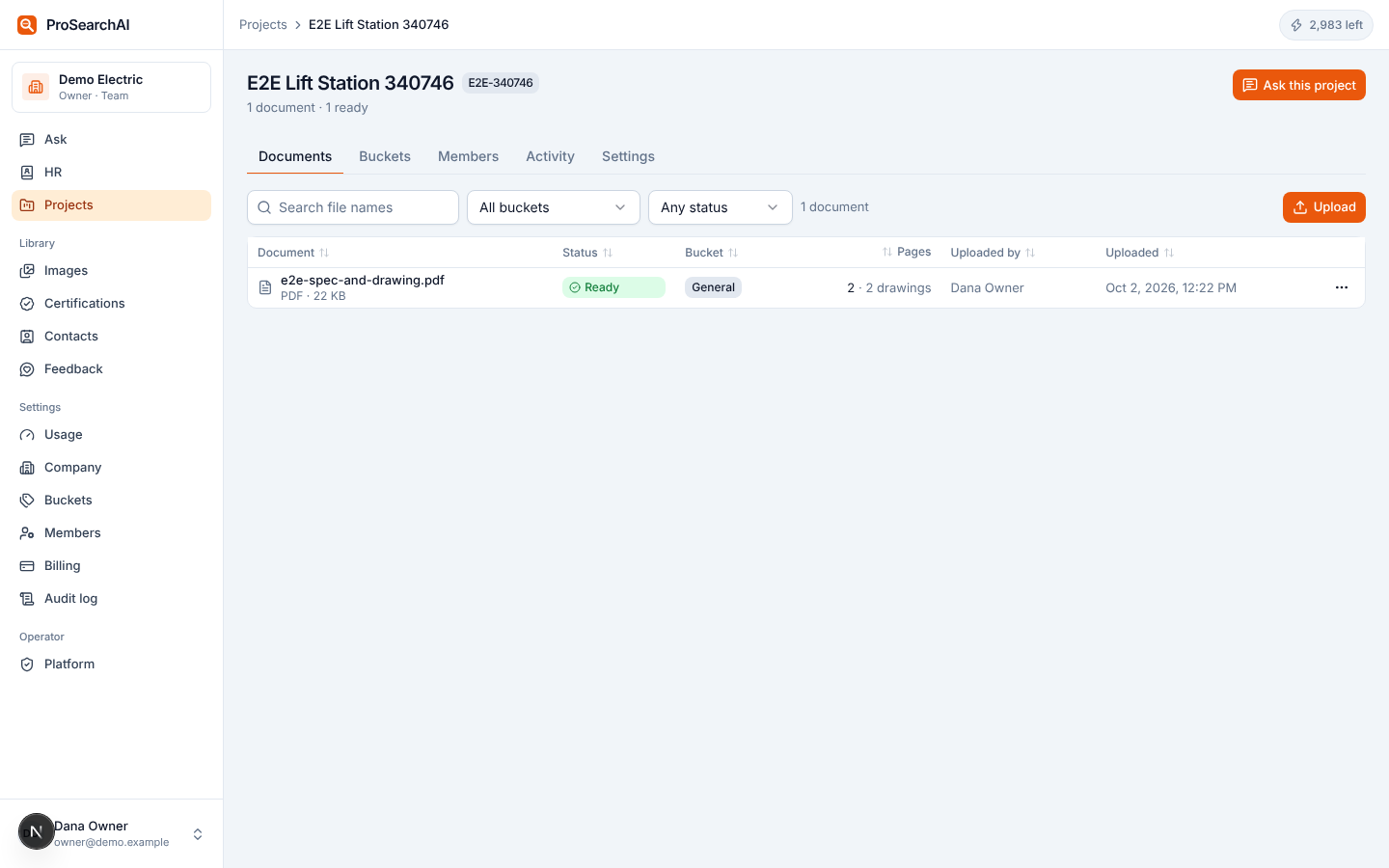
Company defaults, copied into each new project. Add project-local buckets (“Addendum 3”, “Owner furnished”) without touching the others.
An image library that is searchable by what is in the picture
Jobsite photos, equipment nameplates, as-built snapshots and panel photos get a one-sentence caption and a set of keywords from the vision model when they are uploaded. Search by words (“transformer nameplate”, “trench before backfill”) and filter by project.
- Upload from a phone
- Edit titles and tags; captions are kept when a photo moves
- Certification card photos attach to their records
A certifications tracker that emails you before something lapses
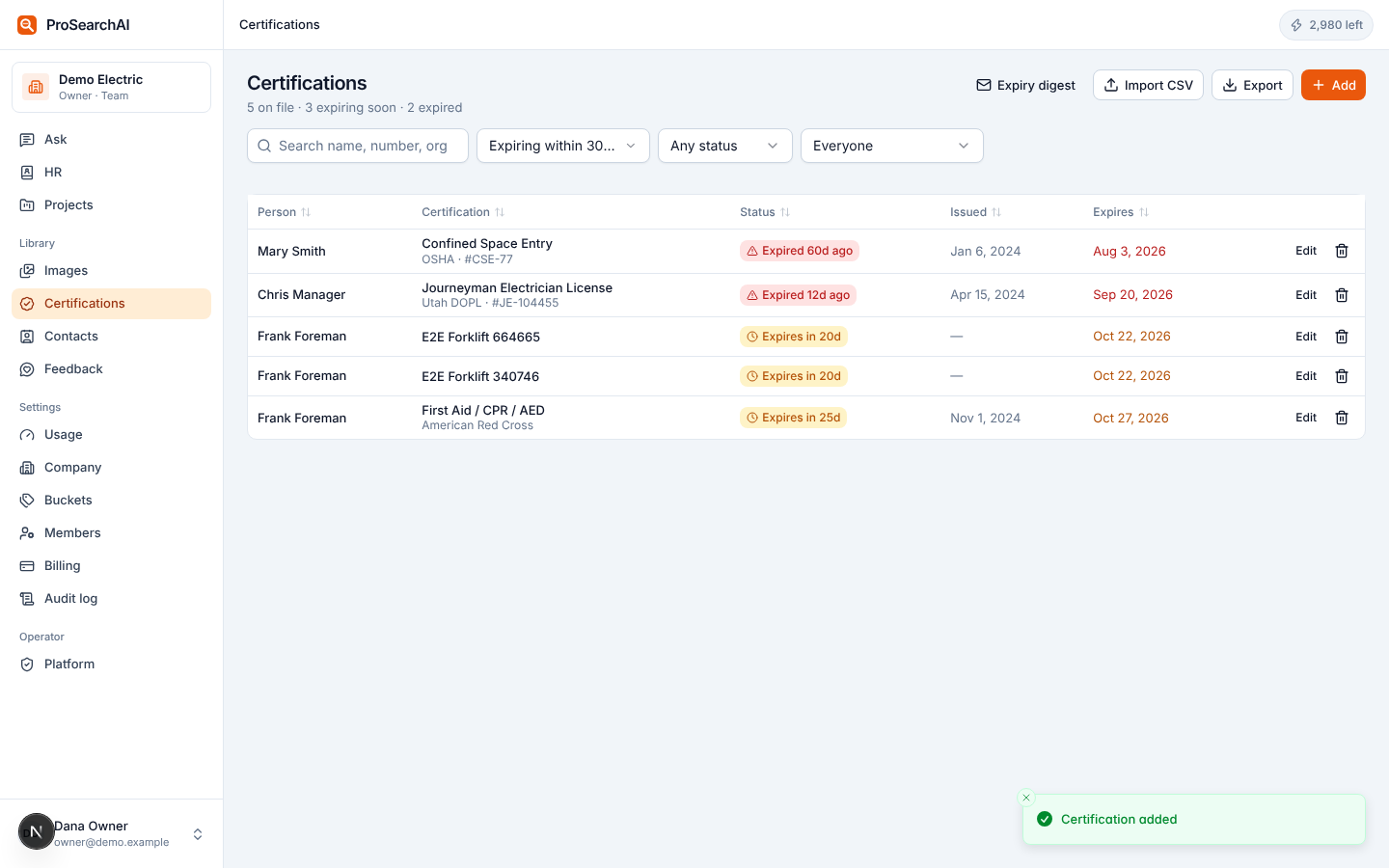
Licenses, OSHA cards, forklift and aerial lift, first aid, confined space, per person, with the number, issuer, dates and a photo of the card. Status is computed: valid, expiring within 60 days, expired. Every week admins get a digest of everything expiring in the next 90 days. Members see their own.
- CSV import and export
- Search by person, cert, number or issuer
- Filter by expiring within 30, 60, 90, 180 or 365 days
Contacts for the people on the job
The inspector, the GC super, the utility coordinator, the gear rep. Name, company, title, phones, email, notes and tags. Import from a spreadsheet with a preview and duplicate check; export any time.
- CSV and XLSX import with dedupe by email and name
- Tags for trade, GC or project
- Managers maintain; everyone can look up
Usage and cost control, with the model bill in the open
Every model call writes a usage event: who, what kind, which model, tokens, images, seconds and the estimated cost. The usage page shows each counter against its plan limit, thirty days of questions, vision sheets and cost, and the event list. Overage packs are off until the owner turns them on; until then asking stops at the limit and nothing is billed.
- Email to owners and admins at 80% and 100% of any counter
- CSV export of events on Company
- Projected overage shown before it happens
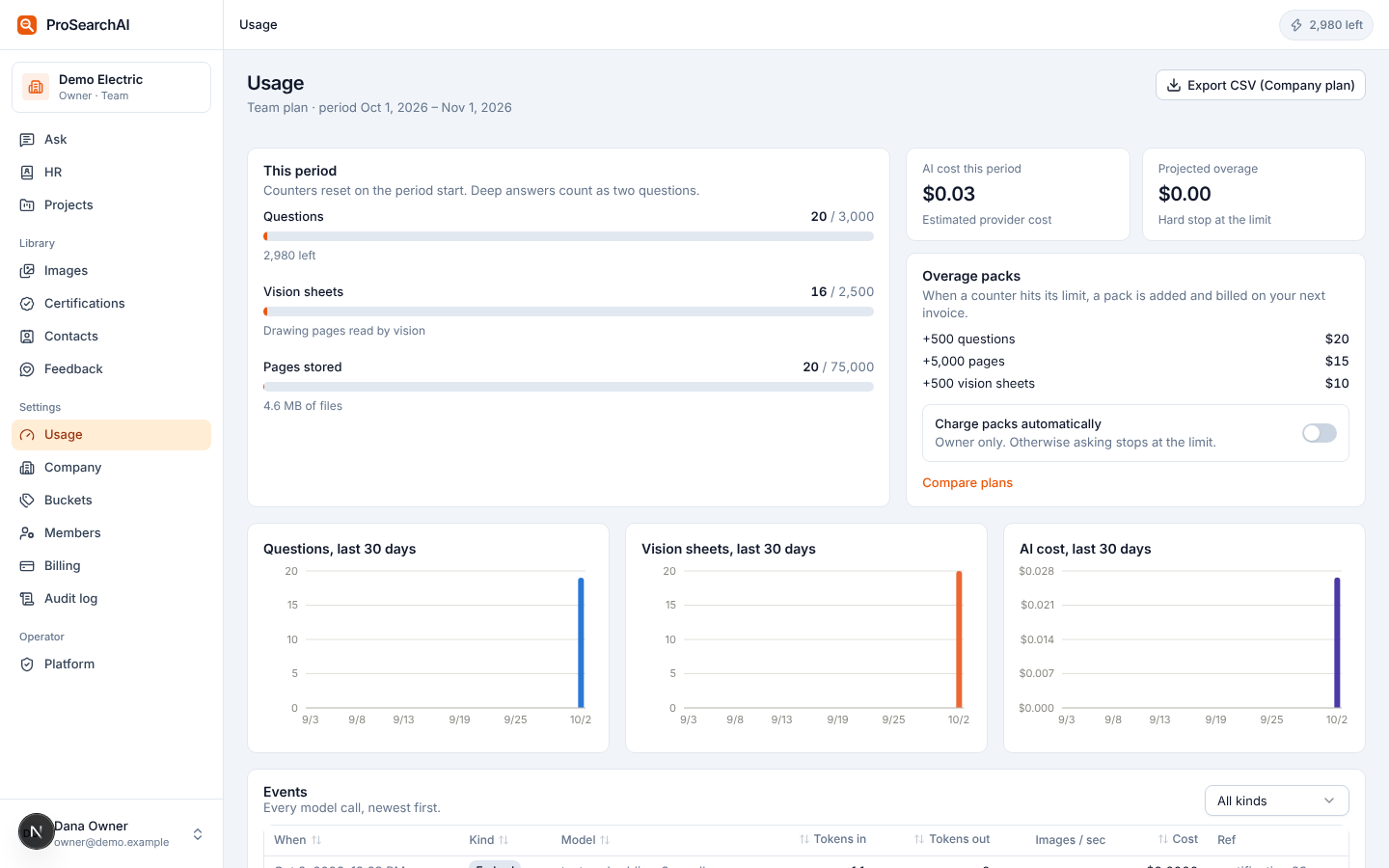
This period, Team plan. Counters reset on the billing date.
Roles, isolation and a file store that never serves a public URL
Owners, admins, managers, members and viewers each see what their role allows. Every company's rows are isolated by row-level security in the database. Files live in a private S3 bucket under your company's prefix and are only ever reached through short-lived signed URLs. Model calls go to OpenAI's API, which does not train on them.
- Audit log of member and settings changes; export on Company
- Export or delete everything, any time
- The long version is on the security page
| Owner | Admin | Manager | Member | Viewer | |
|---|---|---|---|---|---|
| Billing, API keys | ✓ | — | — | — | — |
| Members, company buckets, HR base | ✓ | ✓ | — | — | — |
| Create projects, upload, project buckets | ✓ | ✓ | ✓ | if allowed | — |
| Ask, cite, view pages, voice | ✓ | ✓ | ✓ | ✓ | ✓ |
| Certifications | all | all | all | own | own |
| Usage dashboard | ✓ | ✓ | — | — | — |
Which plan has which feature is laid out on the pricing page. The trial runs on Team, so you can see deep answers and the certifications tracker with your own documents.
Upload one set of drawings and ask it something.
Fourteen days, full Team features, no credit card. Drop in the plans and spec from a live job, wait a few minutes for the sheets to index, and ask the question your foreman asked you this morning.